Chat Charger
Live Chat, all charged up
| before Chat Charger | after |
|---|---|
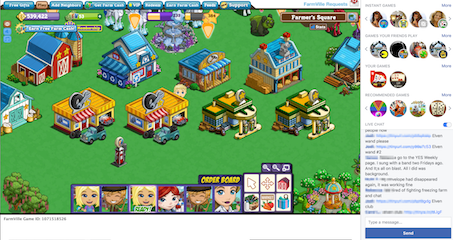 |
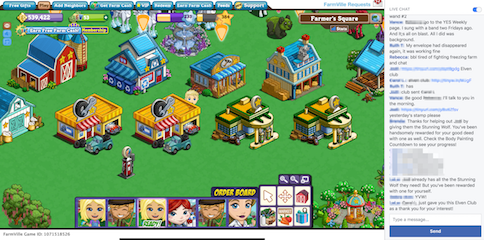 |
| game recommendations so big | 💜🌸 Live Chat is tall. 🌻💛 |
how does it work?
Chat Charger gets rid of the game recommendations and makes the Live Chat window taller. Is this magic or dangerous? No. The bookmark you click changes two display properties. If you’re concerned, have a computer friend review the technical details and code below.
not happy?
If Chat Charger doesn’t work or you don’t like it:
- The effects of Chat Charger are erased every time you reload the Farmville page or restart your browser. Chat Charger has no effect unless you click the bookmark.
- Remove the bookmark from your bookmarks bar. Right click on the Chat Charger bookmark in your bookmark bar, then choose Delete.
- Refresh your browser page to get a fresh copy.
- Please write to me and let me know what happened. I need your feedback to make things better.
Has Chat Charger stopped working? It’s possible that Facebook has changed something. Please let me know and I’ll try to fix it.
future features
If you have suggestions for improving these instructions or Chat Charger, please let me know at: ChatCharger@gmail.com.
Chat Charger cannot change the function of the Live Chat window, but it could change display options like fonts, colors, text sizes. Long range options might include shortening long links, hiding messages from bots, and a when someone mentions your name.
technical details & code
The Chat Charger bookmarklet adds two CSS declarations:
._3ss {display: none;}
hide the game recommendations at top right.
.uiScrollableAreaWrap {max-height: 540px !important;}
expand Live Chat to fill the space vacated by the game recommendations.
This bookmarklet is designed for the Farmville game page. Please don’t use it on other pages. If you do so by accident, reload the page and any effects of the bookmarklet will be banished.
code
You can edit the bookmark to inspect its contents for anything nefarious. Copy the code to a code editor for to make it easier to read. Right click on the Chat Charger bookmark in your bookmark bar and click “Edit” to see the code. Most browsers display the code with the label “URL”.
Here’s a copy of the code from the bookmarklet. The comments are not included in the bookmarklet since they interfere with operation.
(function() {
  var styleElement = document.createElement('style');
  document.head.appendChild(styleElement);
  var styleSheet = styleElement.sheet;
  // Remove the game recommendation sections.
  styleSheet.insertRule(
    '._3ss {display: none;}'
  );
  // Make the Live Chat window taller.
  styleSheet.insertRule(
    '.uiScrollableAreaWrap { max-height: 540px !important; }'
  );
  console.log('Chat Charger version 2.1 loaded. More at ChatCharger.org');
})();
origin
Over time, Facebook/Farmville added more lines of game recommendations in the right column, leaving less space for Live Chat. A couple of times there have been five rows of games, dwarfing the Live Chat area. At this time, the recommendations take about 1/2 the column. I never use those recommendations so I’d really rather have more lines in Live Chat.
For some time I had a Greasemonkey/Tampermonkey script that modified the CSS properties. This worked well for me as I’m a heavy Greasemonkey user and a tech nerd – but it seemed much too complicated for distribution to your average Farmer.
I remembered that a bookmarklet could change CSS, is much easier to install, and doesn’t tamper with your system like Greasemonkey does. So I coded two CSS declarations, bought a domain, and wrote these words. Give it a try and let me know your thoughts. Thanks!
experimental versions
Players of other games might need a different version of Chat Charger. Please try the original version at the top first.
The links below use different settings that might work better for other games. If you still find it doesn’t work for you, please let me know and send screenshots if you can. That helps me to see what’s going on.
Coral Isle
LINK –>> Chat Charger CI <<– LINK